Welcome to the MusicBee Remote extension documentation! This extension allows you to control MusicBee directly from Visual Studio Code. You can view the currently playing track, control playback, adjust volume, and more, all without leaving your editor.
📖 Table of Contents
🚀 Features
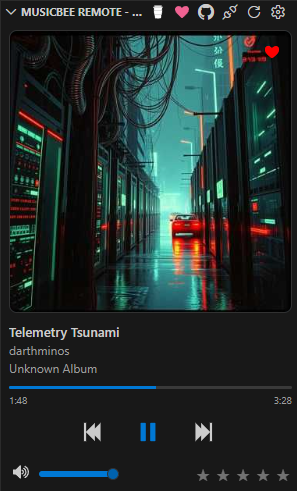
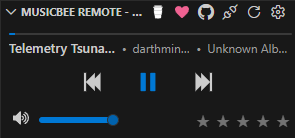
🎵 Now Playing
- View the currently playing track
- Control playback (play, pause, next, previous)
- Mute and unmute audio
- Adjust volume
- View and set track rating
- Mark tracks as favorite
- Display album art and track information
- Independent theme support
⬇️ Installation
From Visual Studio Code Marketplace
- Open Visual Studio Code
- Go to the Extensions view (
Ctrl+Shift+X/Cmd+Shift+X) - Search for “MusicBee Remote”
- Click Install
From Open VSX Registry
For editors that use the Open VSX Registry (e.g., Cursor, VSCodium):
- Open your editor
- Go to the Extensions view (
Ctrl+Shift+X/Cmd+Shift+X) - Search for “MusicBee Remote”
- Click Install
From Command Line
Choose the command based on your editor
code --install-extension darthminos.musicbee-remotecursor --install-extension darthminos.musicbee-remotecodium --install-extension darthminos.musicbee-remoteantigravity --install-extension darthminos.musicbee-remotekiro --install-extension darthminos.musicbee-remotewindsurf --install-extension darthminos.musicbee-remote📸 Screenshots
🎵 Now Playing
📦 Contributors
Made with contrib.rocks.
📄 License
Copyright© 2026 Ryan Conrad
Licensed under the Apache License, Version 2.0 (the “License”); you may not use this file except in compliance with the License. You may obtain a copy of the License at
http://www.apache.org/licenses/LICENSE-2.0
Unless required by applicable law or agreed to in writing, software distributed under the License is distributed on an “AS IS” BASIS, WITHOUT WARRANTIES OR CONDITIONS OF ANY KIND, either express or implied. See the License for the specific language governing permissions and limitations under the License.
Made with ❤️ for the Visual Studio Code community