Task Duration Estimates
Table of Contents
- Overview
- Running Task ETA
- Pre-run Hover Tooltip
- Statistics Tab: Typical Duration
- How It Works
- Requirements
v1.8.0 introduces Task Duration Estimates, surfacing expected task run times based on historical execution data. This feature provides real-time ETAs for running tasks, pre-run estimates in hover tooltips, and a new Typical Duration metric in the Statistics tab.
Overview
Task Duration Estimates surface how long a task is expected to take using an Exponential Moving Average (EMA) computed from its recent execution history. No new data is collected — all estimates derive from the recentDurations ring buffer already stored by Task History.
Estimates appear in three complementary places:
| Surface | When shown | What you see |
|---|---|---|
| Running task tree item | While a task is executing | ~Xs remaining or Longer than expected (~Xs est.) replaces the file-path description |
| Pre-run hover tooltip | Before a task is started (idle) | Estimated duration: ~Xs (based on N runs, variability: Low/Moderate/High) |
| Statistics tab | Any time (requires ≥ 3 runs) | A dedicated Typical Duration row in each task’s metrics card |
A minimum of 3 completed runs is required before any estimate is shown. Tasks with fewer runs display no ETA information.
Running Task ETA
While a task is executing, its description in the task tree updates every second to show the time remaining based on the EMA estimate at the moment the task started.

Display states
| Condition | Tree item description |
|---|---|
| Time remaining > 0 | ~Xs remaining |
| Task has exceeded the estimate | Longer than expected (~Xs est.) |
| Fewer than 3 historical runs | (unchanged — shows the file path as normal) |
The ETA is computed once when the task starts and is not recalculated mid-run, so subsequent history updates do not alter the live display.
When the task finishes, the description reverts automatically to the original file-path text on the next render cycle. The task tree item itself is never mutated — the ETA is applied as a read-only projection, so stale text can never persist.
Pre-run Hover Tooltip
Hovering over an idle task that has at least 3 completed runs shows a tooltip with the EMA estimate and a variability indicator.
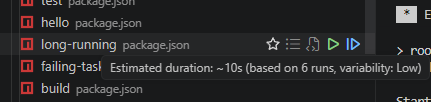
Tooltip format
Estimated duration: ~45s (based on 12 runs, variability: Low)
The variability label describes how consistent the task’s run times are:
| Label | Meaning |
|---|---|
| Low | Task finishes within ~15% of its typical duration — very predictable |
| Moderate | Run time varies by up to ~40% — reasonably consistent |
| High | Run time is highly variable — ETA is less reliable |
Statistics Tab: Typical Duration
The Statistics tab in the Task History panel includes a Typical Duration row in every per-task metrics card. This row shows the EMA alongside the variability bucket, making it easy to compare estimated vs. average duration.

When fewer than 3 runs have been recorded the cell displays —.
How It Works
Exponential Moving Average (EMA)
The estimate is computed from the task’s recentDurations ring buffer (last 100 runs by default, configurable via workspaceTasks.metrics.maxDurationSamples).
- Seeded from the oldest sample: $\text{EMA}_0 = x_0$
- Iterates oldest → newest so recent runs carry more weight (
α = 0.3) - Returns the EMA in milliseconds;
undefinedwhen fewer than 3 samples exist
Variability (Coefficient of Variation)
\[\text{CV} = \frac{\sigma}{\mu}\]| CV range | Label |
|---|---|
| < 0.15 | Low |
| 0.15 – 0.40 | Moderate |
| ≥ 0.40 | High |
Known Limitations
recentDurationsincludes both successful and failed runs. Short-lived failures can pull the EMA down. The variability label provides a visible signal when this is the case.- The metrics key used for the pre-run tooltip is constructed from
taskType,label, and workspace folder name. For tasks launched via Quick Open or with non-standard sources the key may not match, in which case no tooltip is shown.
Requirements
- Minimum 3 completed runs — estimates are suppressed entirely for tasks with fewer than 3 entries in
recentDurations - Metrics must be enabled — set
workspaceTasks.metrics.scopetoworkspace,global, orboth(default:workspace)
See Metrics Configuration for storage and retention settings.