Discovery Settings
Table of Contents
- workspaceTasks.enabledTaskTypes
- workspaceTasks.enabledTaskTypePatterns
- workspaceTasks.disabledTaskTypePatterns
- workspaceTasks.taskfile.additionalFilePatterns
- workspaceTasks.additionalFilePatterns
- workspaceTasks.taskfile.discoverGlobalTaskfile
- workspaceTasks.taskfile.showAliases
- workspaceTasks.shellEnabledTaskTypes
- workspaceTasks.shellPaths
- workspaceTasks.shellAdditionalExtensions
- Shebang Behavior
- Extensionless Shell Scripts
workspaceTasks.enabledTaskTypes
| Type: | object |
| Default: | See below |
{
  "ant": true,
  "bun": false,
  "cake": true,
  "cargo": true,
  "cargo-make": true,
  "cmake": true,
  "composer": true,
  "deno": true,
  "docker": true,
  "eslint": true,
  "github-actions": true,
  "go": true,
  "gradle": true,
  "grunt": true,
  "gulp": true,
  "just": true,
  "jupyter": true,
  "make": true,
  "maven": true,
  "mise": true,
  "msbuild": true,
  "npm": true,
  "pipenv": true,
  "pnpm": false,
  "poe": true,
  "poetry": true,
  "rake": true,
  "ruby": true,
  "shell": true,
  "typescript": true,
  "vscode": true,
  "webpack": true,
  "workspace": true,
  "yarn": false
}
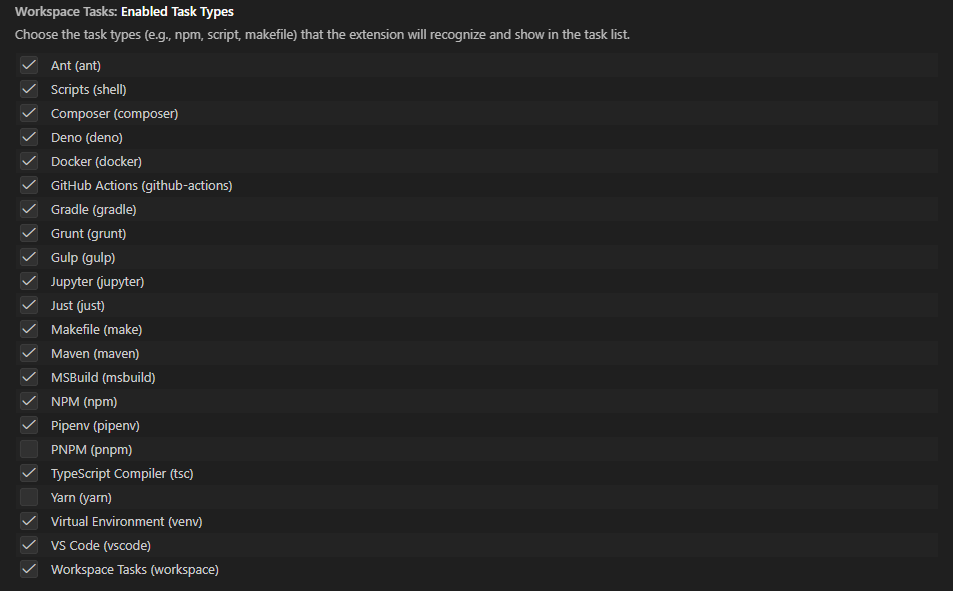
Select which task-type providers are active. Disabling a provider prevents the extension from scanning for tasks of that type, which can improve performance and reduce noise in the task tree.
Available Task Types
- ant - Ant
- bun - Bun
- cake - Cake Build
- cargo - Cargo
- cargo-make - Cargo Make
- cmake - CMake
- composer - Composer
- deno - Deno
- docker - Docker (
dockerfileanddocker-composetask types) - eslint - ESLint
- github-actions - GitHub Actions
- go - Go
- gradle - Gradle
- grunt - Grunt
- gulp - Gulp
- jupyter - Jupyter
- just - Just
- make - Makefile
- maven - Maven
- mise - Mise
- msbuild - MSBuild
- npm - NPM
- pipenv - Pipenv
- pnpm - PNPM
- poe - Poe the Poet
- poetry - Poetry
- rake - Rake
- ruby - Ruby (Gemfile / Rake tasks; see note below)
- shell - Shell scripts
- typescript - TypeScript Compiler
- vscode - Visual Studio Code tasks
- webpack - Webpack
- workspace - Custom Workspace Tasks
- yarn - Yarn
rubyis a dual-control type. TheenabledTaskTypes.rubykey controls Gemfile / Rake-based Ruby tasks. Ruby shell scripts (*.rbfiles) are additionally controlled byworkspaceTasks.shellEnabledTaskTypes.ruby. DisablingenabledTaskTypes.rubydisables both kinds of Ruby tasks; disabling onlyshellEnabledTaskTypes.rubyleaves Rake tasks visible while hiding*.rbshell scripts.
Example:
{
  "workspaceTasks.enabledTaskTypes": {
    "npm": true,
    "gulp": true,
    "grunt": true,
    "ant": false,
    "gradle": false,
    "maven": false,
    "shell": true,
    "vscode": true,
    "workspace": true
  }
}
workspaceTasks.enabledTaskTypePatterns
v1.7.0 Glob pattern controls for task type visibility.
| Type: | string[] |
| Default: | [] |
| Scope: | window |
Glob patterns matched against task type config keys (the same names used in enabledTaskTypes) to enable. When the array is non-empty it acts as a whitelist — only task types whose config key matches at least one pattern are shown. All non-matching types are hidden regardless of their enabledTaskTypes boolean.
enabledTaskTypePatternshas the highest priority. When this array is non-empty it completely overridesdisabledTaskTypePatternsand allenabledTaskTypesboolean values. Set it to["*"]to restore the “show all” baseline while still usingdisabledTaskTypePatternsfor exclusions.
Example — show only npm and pnpm:
{
  "workspaceTasks.enabledTaskTypePatterns": ["npm", "pnpm"]
}
Example — show only Python-ecosystem types:
{
  "workspaceTasks.enabledTaskTypePatterns": ["p*"],
  "workspaceTasks.disabledTaskTypePatterns": ["pipenv"]
}
Example — show all types (restore default while keeping disabled patterns active):
{
  "workspaceTasks.enabledTaskTypePatterns": ["*"],
  "workspaceTasks.disabledTaskTypePatterns": ["bun", "yarn"]
}
workspaceTasks.disabledTaskTypePatterns
v1.7.0 Glob pattern controls for task type visibility.
| Type: | string[] |
| Default: | [] |
| Scope: | window |
Glob patterns matched against task type config keys (the same names used in enabledTaskTypes) to disable. Only evaluated when enabledTaskTypePatterns is empty. Matching types are hidden regardless of their enabledTaskTypes boolean value.
rubydual-control.disabledTaskTypePatterns: ["ruby"]disables both Rake/Gemfile tasks and*.rbshell scripts. To disable only the shell scripts, leaveenabledTaskTypes.rubyunchanged and setshellEnabledTaskTypes.ruby: falseinstead.
Example — disable bun and yarn:
{
  "workspaceTasks.disabledTaskTypePatterns": ["bun", "yarn"]
}
Example — disable all Docker-related providers:
{
  "workspaceTasks.disabledTaskTypePatterns": ["docker*"]
}
Precedence summary
Evaluation order — first matching rule wins:
| Priority | Condition | Result |
|---|---|---|
| 1 | enabledTaskTypePatterns non-empty and matches config key | enabled |
| 2 | enabledTaskTypePatterns non-empty and does not match | disabled |
| 3 | disabledTaskTypePatterns non-empty and matches config key | disabled |
| 4 | enabledTaskTypes[configKey] present | respect the boolean |
| 5 | All other cases | enabled (opt-out default) |
workspaceTasks.taskfile.additionalFilePatterns
| Type: | string[] |
| Default: | [] |
| Scope: | resource |
Additional glob patterns for discovering Taskfiles with non-standard names. These patterns are merged with the built-in Taskfile patterns.
Deprecated in favor of
workspaceTasks.additionalFilePatterns.taskfile. Use the generic setting when possible so discovery patterns stay consistent across providers.
workspaceTasks.additionalFilePatterns
v1.14.0 Add extra file-discovery globs per task type.
| Type: | object |
| Default: | {} |
| Scope: | resource |
Add extra glob patterns for file-based task providers without replacing their built-in patterns. Keys use the same task-type config names shown in workspaceTasks.enabledTaskTypes for file-based providers: ant, bitbucket, bun, cake, cmake, composer, deno, github-actions, gitlab-ci, gradle, grunt, gulp, just, jupyter, make, maven, mise, msbuild, npm, pipenv, pnpm, poe, poetry, rake, taskfile, vscode, workspace, and yarn.
Keys like docker, eslint, go, ruby, shell, typescript, and webpack are intentionally not accepted here because they do not have file-based discovery providers in this extension.
Example:
{
  "workspaceTasks.additionalFilePatterns": {
    "make": ["**/*.mk"]
  }
}
Multiple providers:
{
  "workspaceTasks.additionalFilePatterns": {
    "make": ["**/*.mk"],
    "taskfile": ["**/Taskfile.ci.yml"],
    "gitlab-ci": ["**/.gitlab-ci.staging.yml"]
  }
}
These patterns are merged additively with the built-in provider patterns and are also used for file-watcher registration.
Invalid keys are ignored. Empty arrays are allowed and simply add no extra patterns.
Example:
{
  "workspaceTasks.taskfile.additionalFilePatterns": [
    "**/Taskfile.ci.yml",
    "**/backend/MyTasks.yml"
  ]
}
workspaceTasks.taskfile.discoverGlobalTaskfile
| Type: | boolean |
| Default: | false |
| Scope: | resource |
When enabled, Workspace Tasks discovers Task tasks from global Taskfiles in your home directory ($HOME) using Taskfile filename variants.
Known global candidates are watched for create/change/delete events. When one of those files changes, Workspace Tasks refreshes and re-scans $HOME so global tasks stay current.
Example:
{
  "workspaceTasks.taskfile.discoverGlobalTaskfile": true
}
workspaceTasks.taskfile.showAliases
| Type: | boolean |
| Default: | true |
| Scope: | resource |
Controls whether Taskfile aliases are shown as child items in the task tree. When enabled, a Task task with one or more aliases is shown as a collapsible parent item and each alias appears as an individually runnable child.
When disabled, aliases remain in metadata but are not shown as child items.
Example:
{
  "workspaceTasks.taskfile.showAliases": false
}
workspaceTasks.shellEnabledTaskTypes
| Type: | object |
| Default: | See below |
| Scope: | resource |
{
  "bash": true,
  "batch": true,
  "sh": true,
  "zsh": true,
  "fish": true,
  "nushell": true,
  "perl": true,
  "pwsh": true,
  "python": true,
  "ruby": true,
  "other": true,
  "extensionless": false
}
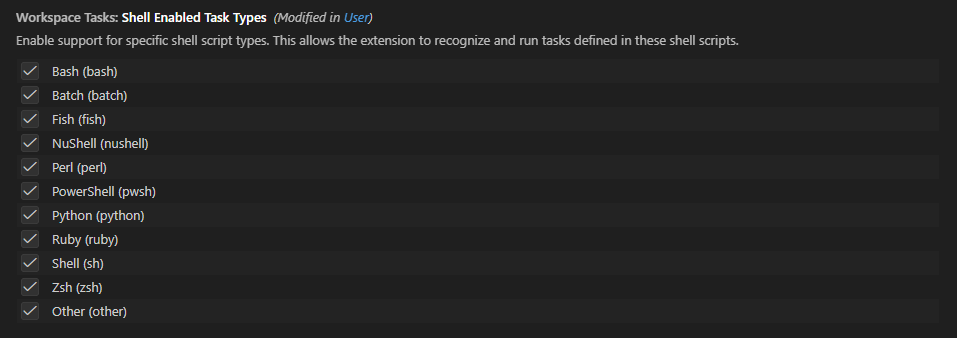
Enable or disable individual shell-script sub-types. This allows fine-grained control over which script file types are recognized as tasks when workspaceTasks.enabledTaskTypes.shell is true.
Supported Shell Types
- bash - Bash
- batch - Batch (
.bat/.cmd) - fish - Fish
- nushell - NuShell
- perl - Perl
- pwsh - PowerShell
- python - Python
- ruby - Ruby
- sh - POSIX Shell
- zsh - Zsh
- other - Any extension registered via
workspaceTasks.shellAdditionalExtensions - extensionless - Extensionless files that have a shebang line (
#!) and an executable bit (chmod +x) — disabled by default; see below
Example:
{
  "workspaceTasks.shellEnabledTaskTypes": {
    "bash": true,
    "pwsh": true,
    "batch": true,
    "python": false,
    "ruby": false,
    "perl": false
  }
}
workspaceTasks.shellPaths
| Type: | object |
| Default: | See below |
| Scope: | resource |
{
  "bash": "bash",
  "batch": "cmd.exe",
  "fish": "fish",
  "nushell": "nu",
  "perl": "perl",
  "pwsh": "pwsh",
  "python": "python",
  "ruby": "ruby",
  "sh": "sh",
  "zsh": "zsh"
}
Specify custom interpreter paths for shell script types. Each key is a shell type and the value is the path to the interpreter executable. The configured interpreter is used when a script does not contain a shebang line (#!), or when the shell type has useShebang set to false.
Example:
{
  "workspaceTasks.shellPaths": {
    "bash": "/usr/local/bin/bash",
    "pwsh": "C:\\Program Files\\PowerShell\\7\\pwsh.exe",
    "python": "python3"
  }
}

workspaceTasks.shellAdditionalExtensions
| Type: | object |
| Default: | {} |
| Scope: | resource |
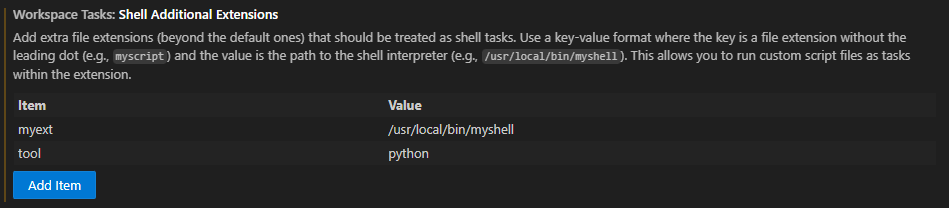
Register extra file extensions (beyond the built-in defaults) that should be treated as shell tasks. The key is a file extension without the leading dot and the value is the path to the interpreter to use for that extension.
Example:
{
  "workspaceTasks.shellAdditionalExtensions": {
    "myext": "/usr/local/bin/myshell",
    "tool": "python"
  }
}
Shebang Behavior
When the extension processes a shell-script file it applies two independent checks:
| Property | Description |
|---|---|
requireShebang | When true, only files that contain a shebang line (#!) are shown as tasks. Files without a shebang are silently ignored for that shell type. |
useShebang | When true, files that contain a shebang line are executed directly (e.g. ./script.py), letting the OS invoke the interpreter named in the shebang. Files without a shebang still use the configured interpreter. |
Defaults per shell type
| Shell type | requireShebang | useShebang | Notes |
|---|---|---|---|
bash | false | true | Scripts with shebangs run directly |
sh | false | true | Scripts with shebangs run directly |
zsh | false | true | Scripts with shebangs run directly |
python | false | true | Scripts with shebangs run directly |
perl | false | true | Scripts with shebangs run directly |
ruby | false | true | Scripts with shebangs run directly |
fish | false | false | Always uses the configured interpreter |
pwsh | false | false | Always uses the configured interpreter |
batch | false | false | Always uses the configured interpreter |
nushell | false | false | Always uses the configured interpreter |
If a script has a shebang but is not marked executable, direct execution will fail. Either make the script executable or configure
workspaceTasks.shellPathswith the desired interpreter — the configured interpreter is always used when no shebang is present.
Extensionless Shell Scripts
Opt-in feature — disabled by default. Enable with
workspaceTasks.shellEnabledTaskTypes.extensionless: true.
The extension can discover shell scripts that have no file extension (e.g. scripts named build, deploy, run). Because scanning every extensionless file in a workspace has measurable I/O overhead, this feature is off by default.
Requirements
A file is included as an extensionless task only when both conditions are met:
- Shebang line — the first two bytes are
#!(e.g.#!/usr/bin/env bash). - Executable bit — the file has at least one execute permission bit set (
chmod +x). On Windows, where execute bits do not exist, any extensionless file with a shebang is included automatically.
Execution model
Extensionless tasks are run directly — the extension does not extract the interpreter from the shebang. Instead the OS kernel reads the shebang at launch time and invokes the correct interpreter. This means the task command is simply the relative file path (e.g. ./build), and no additional configuration is needed regardless of which interpreter the shebang names.
Performance
When enabled, extensionless discovery runs as a background scan that is independent of the main shell-type discovery. The treeview populates first with typed-extension scripts (.sh, .py, etc.) and then refreshes a second time when the extensionless scan completes. The shebang cache is shared with typed-extension scripts so repeated refreshes are fast. Results from the previous scan are returned synchronously on subsequent getTasks() calls.
To minimize I/O, the following directories are excluded from the scan before any file reads:
node_modules, .git, .venv, dist, out, build, coverage, .vscode, .vscode-test
Additionally, hidden files (names starting with .) are excluded at the filtering stage — files such as .env and .gitignore have an empty extension but are not scripts.
Enabling
{
  "workspaceTasks.shellEnabledTaskTypes": {
    "extensionless": true
  }
}
In large workspaces with many extensionless files the first scan may take a noticeable amount of time. Use the extension’s built-in exclusion patterns (
workspaceTasks.excludePatterns) to limit the scan scope if needed.