Task Execution Settings
Table of Contents
- workspaceTasks.task.confirmPatterns
- workspaceTasks.task.presentationOptions
- workspaceTasks.task.forceStopMethod
- workspaceTasks.task.stopCompoundDependencies
- Related
workspaceTasks.task.confirmPatterns
v1.8.0 — New setting
| Type: | array of string |
| Default: | [] |
| Scope: | resource |
Array of regular expression strings (case-insensitive) matched against task labels. Any task whose label matches at least one pattern will require confirmation before it runs. This is the pattern-matching source for the Run Guard feature.
Patterns are evaluated against the task’s original label (before any grouping prefix is added). Invalid regex strings are silently skipped.
Example:
{
  "workspaceTasks.task.confirmPatterns": [
    "deploy.*",
    "db:drop",
    "terraform apply",
    ".*:prod$"
  ]
}
| Pattern | Matches |
|---|---|
deploy.* | deploy, deploy-prod, deploy to staging |
db:drop | db:drop (exact) |
.*:prod$ | deploy:prod, release:prod |
terraform | Any label containing terraform |
Combine confirmPatterns with the Manual Toggle and the Definition Flag for layered protection. All three sources may be active at once — the dialog only appears once per run regardless.
workspaceTasks.task.presentationOptions
| Type: | object |
| Default: | {} |
| Scope: | resource |
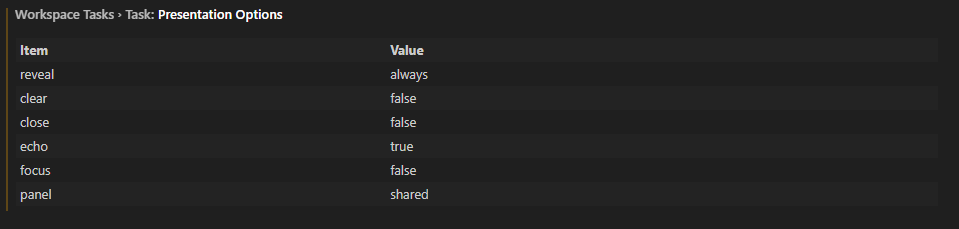
Default terminal presentation options applied to every task run by the extension. These mirror the standard VS Code task presentation block. Individual tasks can still override these values in their own task definition.
workspaceTasks.task.presentationOptions.reveal
| Type: | string |
| Default: | "always" |
| Options: | "always", "silent", "never" |
| Scope: | resource |
Controls whether the task output panel is revealed when the task starts.
- always - Always open and reveal the terminal panel
- silent - Reveal the panel only if the task fails
- never - Never reveal the panel automatically
workspaceTasks.task.presentationOptions.clear
| Type: | boolean |
| Default: | false |
| Scope: | resource |
When true, the terminal is cleared before executing the task.
workspaceTasks.task.presentationOptions.close
| Type: | boolean |
| Default: | false |
| Scope: | resource |
When true, the terminal is closed after the task completes.
workspaceTasks.task.presentationOptions.echo
| Type: | boolean |
| Default: | true |
| Scope: | resource |
When true, the command line is echoed in the terminal before execution.
workspaceTasks.task.presentationOptions.focus
| Type: | boolean |
| Default: | false |
| Scope: | resource |
When true, the terminal panel receives focus when the task starts.
workspaceTasks.task.presentationOptions.panel
| Type: | string |
| Default: | "shared" |
| Options: | "dedicated", "shared", "new" |
| Scope: | resource |
Controls which terminal panel is used for the task.
- shared - Reuse the same terminal panel across tasks
- dedicated - Use a terminal panel dedicated to this task
- new - Create a new terminal panel every time the task runs
Example:
{
  "workspaceTasks.task.presentationOptions": {
    "reveal": "always",
    "clear": false,
    "close": false,
    "echo": true,
    "focus": false,
    "panel": "shared"
  }
}
workspaceTasks.task.forceStopMethod
| Type: | string |
| Default: | ask |
| Allowed values: | ask, SIGINT, SIGTERM, SIGKILL |
| Scope: | resource |
Controls how a task is force-stopped when clicking Stop a second time, after the initial SIGINT (Ctrl+C) has already been sent and the process has not yet exited.
ask(default) — Shows a Quick Pick so you can choose the signal interactively each time.SIGINT— Sends a second interrupt signal (Ctrl+C) via the terminal.SIGTERM— Requests the process to terminate gracefully. The terminal is preserved when possible.SIGKILL— Immediately force-kills the process. Cannot be caught or ignored. The terminal is preserved when possible.
When the terminal panel is preserved depends on the task’s presentation.close setting. If presentation.close is false (the default), the terminal stays open after the process exits so you can review the last output.
Example:
{
  "workspaceTasks.task.forceStopMethod": "SIGKILL"
}
workspaceTasks.task.stopCompoundDependencies
| Type: | boolean |
| Default: | true |
| Scope: | resource |
When true, stopping a compound task also stops all of its dependsOn child tasks that are currently running. When false, child tasks are allowed to continue running after the parent compound task is stopped.
Example:
{
  "workspaceTasks.task.stopCompoundDependencies": true
}