Inline CodeLens Actions
Table of Contents
- Overview
- Supported File Types
- Available Actions
- Configuration
- Behavior Notes
- Known Limitations
- Related
Overview
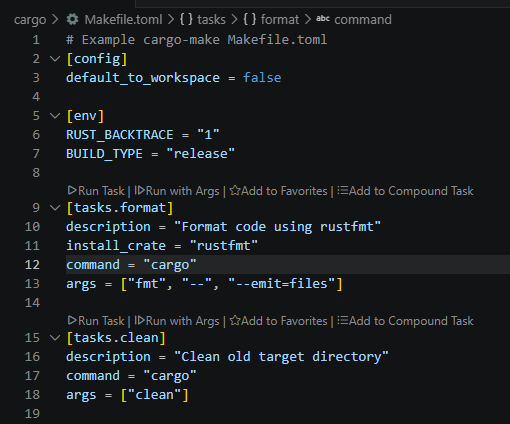
Workspace Tasks adds inline CodeLens action buttons directly above each task definition in its source file. You can run, favorite, add to a compound task, or hide a task without ever leaving the editor.
Supported File Types
CodeLens actions appear in any file that Workspace Tasks can discover tasks from, including:
package.json(npm/yarn/pnpm/bun scripts)Taskfile.yml/Taskfile.yamlMakefile.github/workflows/*.yml(GitHub Actions).gitlab-ci.yml(GitLab CI)Cargo.toml(cargo-make)pyproject.toml/Makefile(Poetry/poe)build.gradle(Gradle)pom.xml(Maven)*.sh(shell scripts)- …and all other supported task provider types
Available Actions
Each visible task gets a row of CodeLens lenses positioned above its definition line:
| Lens | Command | Condition |
|---|---|---|
| $(debug-start) Run Task | workspaceTasks.runTask | Task is idle |
| $(debug-stop) Stop Task | workspaceTasks.stopTask | Task is currently running |
| $(debug-continue) Run with Args | workspaceTasks.runTaskWithArgs | Task is idle |
| $(star) Add to Favorites | workspaceTasks.addToFavorites | Task is not a favorite |
| $(star-full) Remove from Favorites | workspaceTasks.removeFromFavorites | Task is a favorite |
| $(list-unordered) Add to Compound Task | workspaceTasks.addToCompoundTask | Task is not queued |
| $(trash) Remove from Compound Task | workspaceTasks.removeFromCompoundTask | Task is in a compound task |
The Run with Args and Stop Task lenses are mutually exclusive with Run Task — only the appropriate one is shown based on the task’s current status.
Configuration
Enable / Disable All CodeLens Actions
Set workspaceTasks.codeLens.enabled to false to remove all CodeLens lenses from every file:
{
  "workspaceTasks.codeLens.enabled": false
}
Control Individual Actions
Individual lenses are controlled by workspaceTasks.codeLens.actionBar flags used by the tree view action bar:
{
  "workspaceTasks.codeLens.actionBar": {
    "run": true,
    "runWithArgs": false,   // hides Run with Args lens
    "favorite": true,
    "queue": false          // hides Add/Remove Compound Task lenses
  }
}
Behavior Notes
- Show Hidden Mode — When show-hidden mode is active, hidden tasks display an Unhide Task lens instead of the standard visible-task lenses.
- Running Tasks — The Run Task lens is replaced by Stop Task while the task is executing. Run with Args is hidden while the task is running.
- Workspace Trust — CodeLens lenses are suppressed entirely in untrusted workspaces, consistent with all other extension features.
- No-location Tasks — Tasks that cannot be mapped to a specific line in their source file do not receive a CodeLens row.
Known Limitations
Right-Click on a CodeLens Lens Triggers Action, Not Context Menu
VS Code’s CodeLens API does not support context menus. Right-clicking on a lens opens the standard editor context menu rather than a task-specific menu. This is a VS Code platform limitation and cannot be addressed by the extension.
Use the task tree view to access the full task context menu.
GitLab CI — Line Numbers Require File Access
GitLab CI job definitions are discovered via the gitlab-ci-local --list-json command, which does not report source line numbers. The extension subsequently scans the .gitlab-ci.yml file to locate each job’s line. If the workspace is untrusted or the file is inaccessible, no CodeLens rows are shown for GitLab CI jobs.
Jobs defined in external files included via the include: keyword cannot be mapped to a line in the root .gitlab-ci.yml and will not receive a CodeLens row.