Compound Tasks
As of v1.5.0, Queues have been renamed to Compound Tasks to align with Visual Studio Code’s terminology. The main feature remains the same, but now they can be executed sequentially or in parallel. You may see “Compound Task” in some UI elements and documentation for clarity during the transition. VSCode Compound Tasks are referenced as “VSCode Compound Tasks” to differentiate from Workspace Tasks’ Queues.
Table of Contents
- Overview
- Execution Modes
- How to Add a Task to a Compound Task
- How to Run a Compound Task
- How to Use
- Features
- Example Workflow
- VSCode Compound Tasks in the Compound Tasks Group
- Workspace Tasks Compound Tasks vs. VSCode Compound Tasks
- Compound Task Management
- Tips
- Next Steps
Overview
Create and manage multiple named compound tasks to run tasks either sequentially (one after another) or in parallel (all at once). Compound Tasks are perfect for complex workflows like CI/CD pipelines, multi-step builds, or deployment sequences.
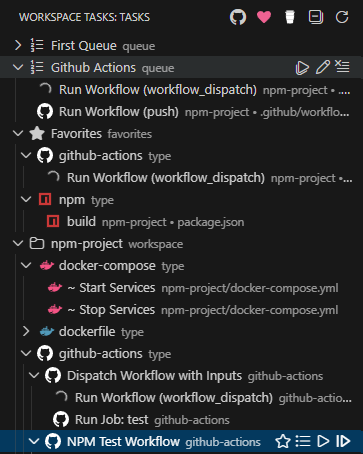
Execution Modes
Each compound task supports two execution modes:
| Mode | Icon | Behavior |
|---|---|---|
| Sequential | sequential.svg | Tasks run one at a time, in order. If a task fails, the compound task stops. |
| Parallel | parallel.svg | All tasks launch simultaneously. A failure in one does not stop others. |
The compound task group item in the tree displays the current mode via its icon — a sequential icon or a parallel icon.
Changing the Execution Mode
Hover over a compound task in the tree to reveal its action bar, then click the Toggle Compound Task Execution Type button ($(arrow-swap)). The compound task icon updates immediately to reflect the new mode:
- Sequential → Parallel
- Parallel → Sequential
You can also right-click the compound task and choose Toggle Compound Task Execution Type from the context menu.
How to Add a Task to a Compound Task
- Hover over any task in the tree to reveal the action bar
- Click the compound task icon (
$(list-unordered)) in the action bar — or right-click the task and select Add to Compound Task - If no compound tasks exist, enter a name for a new compound task in the input box that appears
- If compound tasks already exist, select one from the list or choose New Compound Task… to create a new one
- The task appears in the selected compound task under the Compound Tasks group in the task tree
How to Run a Compound Task
- In the Compound Tasks group, hover over the compound task name to reveal its action bar
- Click the Run All button to execute all tasks in sequence from the beginning
- To start from a specific task, hover over that item in the compound task and click its Run button
How to Use
- Click the list icon next to any task to add it to a compound task
- Choose an existing compound task or create a new one
- Drag and drop tasks to reorder them within the compound task
- Click the run button on the compound task to execute all tasks in sequence, or start from a specific task
Features
- Multiple Compound Tasks — Create separate compound tasks for different workflows (e.g., “Build”, “Deploy”, “CI Pipeline”)
- Sequential or Parallel Execution — Toggle each compound task between sequential (one-at-a-time, stops on failure) and parallel (all at once) modes
- Execution Mode Icon — The compound task group icon shows the current mode:
sequential.svgorparallel.svg - Drag & Drop Reordering — Easily reorder tasks within and across compound tasks
- Visual Context — Each compound task item shows the task icon, label, workspace name, and file path
- VSCode Task Dependency Display — When a VSCode task that has
dependsOnis added to a compound task, its dependency tasks are shown as expandable sub-items in the tree for quick reference - VSCode Compound Tasks in Group — When the Compound Tasks group and the
includeVsCodeCompoundTaskssetting are both enabled, VSCode compound tasks (those usingdependsOnintasks.json) are automatically surfaced inside the Compound Tasks group alongside your user-defined compound tasks - Compound Task Controls — Run the entire compound task, start from a specific task, or stop execution
- Compound Task Management — Rename compound tasks, clear all tasks, or delete empty compound tasks
- Persistent Storage — Compound tasks and their execution modes are saved and restored between sessions
- Status Indicators — Real-time visual feedback with running/success/failure icons
- Settings Sync — Compound tasks automatically sync across all your machines when VS Code Settings Sync is enabled
Example Workflow
CI Pipeline (Sequential Mode):
1. Install Dependencies  (npm install)
2. Lint Code             (npm run lint)
3. Run Tests             (npm test)
4. Build Production      (npm run build)
5. Deploy to Staging     (deploy.sh)
Run all tasks in sequence by clicking the run button on the compound task — Workspace Tasks executes each one automatically and stops if any task fails.
VSCode Task Dependencies in Compound Tasks
When a VSCode task that uses dependsOn is added to a compound task, the tree displays its dependency tasks as expandable sub-items:
My Compound Task:
  ▼ Full Build  (vscode)           ← VSCode compound task with dependsOn
      ├─ Compile TypeScript        ← dependency task
      └─ Copy Assets               ← dependency task
  ▶ Run Tests   (npm)
  ▶ Deploy      (shell)
This gives you a quick view of which tasks will run as part of the VSCode task, directly in the compound task tree.
VSCode Compound Tasks in the Compound Tasks Group
When the Compound Tasks group is enabled (workspaceTasks.groups.compoundTasks.enabled) and the Include VS Code Compound Tasks setting is turned on (workspaceTasks.compoundTasks.includeVsCodeCompoundTasks), any VSCode task that uses dependsOn is automatically surfaced inside the Compound Tasks group — alongside your user-defined compound tasks.
Each VSCode compound task entry is expandable, showing all of its dependsOn dependency tasks as sub-items directly in the tree. This makes it easy to see your entire compound-task landscape — both native VSCode compound tasks and user-defined queues — in one place.
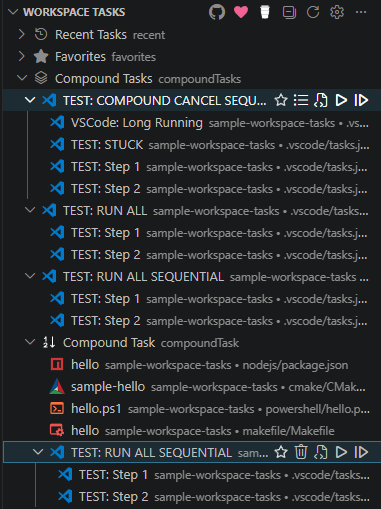
VSCode compound tasks still appear in the normal task tree (under their group and label) regardless of this setting. Enabling includeVsCodeCompoundTasks only adds them to the Compound Tasks group as an additional entry — it does not remove them from their original location.
Required Settings
| Setting | Type | Default | Description |
|---|---|---|---|
workspaceTasks.groups.compoundTasks.enabled | boolean | false | Enable the Compound Tasks group in the task view. |
workspaceTasks.compoundTasks.includeVsCodeCompoundTasks | boolean | true | When enabled (along with the group setting above), include VSCode compound tasks in the Compound Tasks group. |
Both settings must be enabled for VSCode compound tasks to appear in the Compound Tasks group.
{
  "workspaceTasks.groups.compoundTasks.enabled": true,
  "workspaceTasks.compoundTasks.includeVsCodeCompoundTasks": true
}
Workspace Tasks Compound Tasks vs. VSCode Compound Tasks
VSCode’s native compound tasks (defined via dependsOn in tasks.json) and Workspace Tasks compound tasks are complementary. You can use both together — in fact, you can add a VSCode compound task into a Workspace Tasks compound task. The table below highlights where Workspace Tasks compound tasks offer additional flexibility.
| Capability | Workspace Tasks Compound Tasks | VSCode Compound Tasks |
|---|---|---|
| Works with any task type (npm, shell, cmake, powershell, etc.) | ✅ | ❌ VSCode tasks only |
| Add a VSCode compound task as a step | ✅ | ✅ |
| Create and manage entirely through the UI | ✅ | ❌ Requires editing tasks.json |
| Toggle sequential ↔ parallel with one click | ✅ | ❌ Requires editing tasks.json |
| Start execution from any step in the list | ✅ | ❌ Always starts from the first dependency |
| Drag & drop to reorder steps | ✅ | ❌ Requires editing tasks.json |
| Per-task real-time status icons (running / success / failure) | ✅ | ✅ |
| Multiple independent named compound tasks | ✅ | ✅ (separate task entries) |
| Stop the entire chain with one action | ✅ | ✅ (with stopCompoundDependencies) |
| Persistent without committing a file to source control | ✅ Settings Sync | ❌ Stored in tasks.json |
| Can be added to Favorites | ✅ | ✅ |
When to Use Each
Use VSCode compound tasks when:
- Your workflow is tightly coupled to the project and should be shared with all contributors via
tasks.json - You need VS Code to resolve task dependencies automatically (e.g., pre-built chains with
dependsOn) - The steps are always the same and don’t need to change often
Use Workspace Tasks compound tasks when:
- You want a UI-driven workflow that doesn’t require editing any JSON files
- You need to mix different task types in a single sequence (npm scripts, shell commands, cmake targets, etc.)
- You want to easily toggle between sequential and parallel execution
- You want to skip ahead and start from the middle of a long pipeline
- You want a personal workflow that is synced via Settings Sync rather than committed to the repo
Use both together when:
- You have project-defined VSCode compound tasks that you want to chain with other task types
- You want to wrap one or more VSCode compound tasks inside a larger Workspace Tasks compound task pipeline
Compound Task Management
Use the actions in the compound task’s title bar to:
- Run All — Execute all tasks in the compound task from the beginning
- Rename — Give the compound task a descriptive name (e.g., “Full CI Build”)
- Clear — Remove all tasks from the compound task
- Toggle Execution Type — Switch between sequential and parallel execution
- Delete — Remove an empty compound task entirely
Tips
- Add the same task to multiple compound tasks for different workflows
- Start a compound task from a specific task by clicking the play icon next to that item
- Stop a running compound task with the stop button in the compound task’s title bar
- Drag tasks between compound tasks to reorganize your workflows
Next Steps
- Favorites & Recent Tasks — Pin and track frequently used tasks
- Configuration — Full settings reference